Kubernetes
The unified-cache-chart packages the configuration needed to run one
vLLM-UC model on an existing Kubernetes cluster. One Helm release owns one
model; deploy another release when you need another model.
The inference-engine path is kthena-only. Helm creates a ModelServing
declaration, and the pre-installed kthena control plane turns its roles into
vLLM entry and worker Pods. A PD deployment also creates ModelServer and
ModelRoute declarations so requests can enter through the cluster's
kthena-router.
The whole Chart is not CRD-only. Helm also creates native Kubernetes support
resources such as Services, ConfigMaps, Secrets, storage objects, and an
optional ServiceMonitor. A Mooncake PD profile can additionally create a
Mooncake master Deployment and Service.
Open the architecture diagram at full size. On narrow screens, scroll horizontally to inspect it without shrinking the labels.
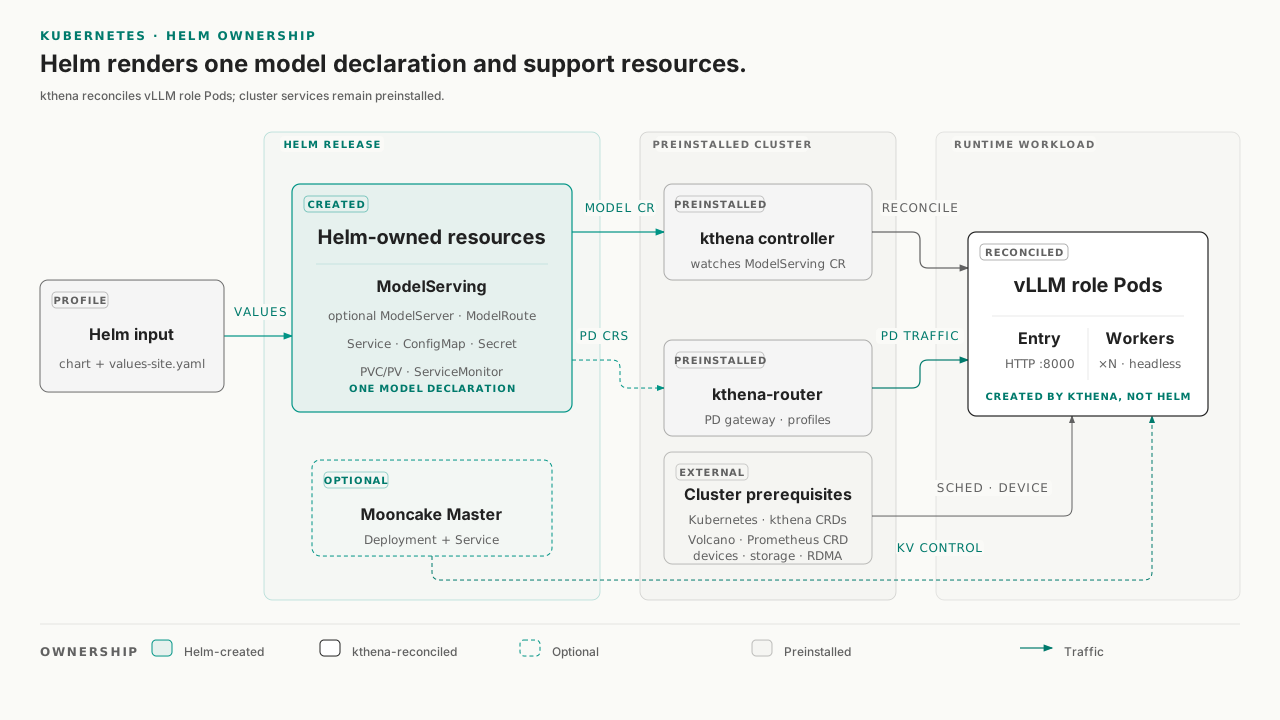
The Chart does not install kthena, Volcano, device plugins, storage drivers, or Prometheus Operator. Those cluster services must already exist when the selected configuration depends on them.
Choose a deployment profile
The Chart archive includes 14 profiles under models/. A profile selects a
platform's device resources, a model, and a deployment shape by filling
servingEngineSpec.modelSpec.roles[] and, for PD, modelSpec.pd.
It does not select a matching engine image.
| Platform | Model | Included profiles |
|---|---|---|
| CUDA | Qwen3-0.6B | single-node 1e1, two-node 1e2, PD 1p1-1d1, 2p1-2d1, and 2p2-2d2 |
| CUDA | DeepSeek-R1-AWQ | single-node and multi-node |
| Ascend | Qwen3-0.6B | single-node 1e1, two-node 1e2, PD 1p1-1d1, 2p1-2d1, and 2p2-2d2 |
| Ascend | DeepSeek-V3.1 | multi-node |
| Ascend | Qwen3-235B | multi-node |
The current Qwen profiles render these engine layouts when
modelSpec.replicas remains 1:
| Shape | Role configuration | vLLM Pods | Request path |
|---|---|---|---|
1e1 |
one engine role, replicas: 1, workerReplicas: 0 |
1 entry | release Service |
1e2 |
one engine role, replicas: 1, workerReplicas: 1 |
1 entry + 1 worker | release Service |
1p1-1d1 |
one prefill and one decode instance, no workers | 2 | kthena-router |
2p1-2d1 |
two prefill and two decode instances, no workers | 4 | kthena-router |
2p2-2d2 |
two prefill and two decode instances, each with one worker | 8 | kthena-router |
All six bundled PD profiles currently create a Mooncake master and use
MooncakeConnectorV1 with UCM. Other connector combinations are Chart
configuration capabilities, not packaged deployment profiles.
Profiles are deployment examples
The bundled profiles are not portable, ready-to-run values. The combined base and profile configuration contains cluster-specific storage classes, NFS paths, RDMA resource names, resource requests, and scheduling assumptions. Its presence in the archive proves that the Chart can render those configurations; it does not prove that the model has passed GPU/NPU, RDMA, storage, or kthena cluster acceptance in your environment.
Before you install
Cluster services
Prepare the following services and resources before rendering the release:
| Requirement | Why it is needed | How to adapt the Chart |
|---|---|---|
Kubernetes >=1.19 and Helm 3 |
Declared Chart runtime | Verify with kubectl version and helm version |
| kthena controller and CRDs | Reconciles ModelServing and creates the engine Pods |
Install kthena before this Chart |
| kthena-router for PD or routed profiles | Resolves ModelServer and ModelRoute and accepts client traffic |
Use the gateway from the existing kthena installation |
| Matching GPU/NPU driver and device plugin | Supplies the resource keys requested by the selected profile | Keep only resource keys that exist on your nodes |
| Engine image and pull credentials | Runs vLLM with UCM integration for the selected platform | Set images.engine or modelSpec.image, plus imagePullSecret when required |
| Model and UCM storage | Makes modelPath and cache backends visible inside the container |
Replace the example NFS and StorageClass values |
Two defaults create additional dependencies:
servingEngineSpec.schedulerNamedefaults tovolcano. Install Volcano, or set it to an empty string to use the default Kubernetes scheduler.servingEngineSpec.serviceMonitor.enableddefaults totrue. If the cluster does not have the Prometheus OperatorServiceMonitorCRD, set it tofalsebefore installation.
The Chart also defaults to hostNetwork: true, hostIPC: true, and host port
8000 for every vLLM container. Each engine Pod therefore needs a node where
port 8000 is free, including when several releases share the cluster.
Multi-node and PD profiles must have enough eligible nodes, and their security
context must be allowed by the namespace's Pod security policy.
Get and unpack the Chart
Open the matching
GitHub Release,
copy the unified-cache-chart asset URL, and let Helm download and unpack it:
helm pull "<chart-url>" --untar
cd unified-cache-chart
When working from a source checkout instead, enter
charts/unified-cache-chart directly. Helm loads the Chart's root
values.yaml automatically; do not install that file by itself because it
does not define modelSpec.roles[].
Create site-specific values
Start from the smallest profile that matches your accelerator:
cp models/cuda/values-qwen3-0p6b-1e1.yaml values-site.yaml
cp models/ascend/values-qwen3-0p6b-1e1.yaml values-site.yaml
Edit the copied file before running Helm:
| Configuration | Required change |
|---|---|
| Engine image | Add a matching images.engine.repository and tag or digest; profiles do not select the image for you. |
| Model identity | Set modelSpec.modelPath to the container-visible path and set modelName to the name clients will send to the OpenAI-compatible API. |
| Model mount | Replace the root extraStorage NFS example, or provide another supported hostPath, PVC, CSI, or NFS source that exposes modelPath. |
| UCM storage | Replace the example unifiedcacheStorage StorageClass and capacity with a cache backend available in the cluster. |
| Accelerator resources | Keep the correct nvidia.com/gpu or huawei.com/Ascend910 key and replace RDMA, CPU, memory, runtime class, labels, and tolerations with values from your nodes. |
| Scheduling and monitoring | Decide whether to keep Volcano and ServiceMonitor; change the defaults when those cluster services are absent. |
| Network topology | Keep automatic interface detection only when it selects the correct fabric; otherwise provide nodeTopologyConfig or forceInterface. |
Helm replaces list values instead of merging their individual elements. Edit
the copied profile as a complete deployment file rather than layering a
partial roles[] or storage list on top of it.
The base Chart does not enable UCM by itself. UCM becomes effective when
modelSpec.unifiedcacheConfig.config is non-empty and its enabled switch is
not false. The bundled profiles supply both the configuration and
unifiedcacheStorage; changing either side must preserve that relationship.
Render and install
Set a release name and namespace, then validate the site values before changing the cluster:
export UCM_RELEASE=qwen3
export UCM_NAMESPACE=ucm

helm lint --strict . -f values-site.yaml
helm template "$UCM_RELEASE" . \
  --namespace "$UCM_NAMESPACE" \
  -f values-site.yaml \
  > /tmp/ucm-rendered.yaml
Inspect /tmp/ucm-rendered.yaml. For a single-node profile, it should contain
ModelServing, a release Service, and the configured support resources. A PD
profile should additionally contain ModelServer and ModelRoute; profiles
that create a Mooncake master also contain its Deployment and Service.
When the namespace and required CRDs already exist, ask the Kubernetes API to validate the rendered objects without persisting them:
kubectl apply --dry-run=server -f /tmp/ucm-rendered.yaml
Install only after the local render and optional server-side validation match the intended platform and topology:
helm upgrade --install "$UCM_RELEASE" . \
  --namespace "$UCM_NAMESPACE" \
  --create-namespace \
  -f values-site.yaml
Verify the deployment
Start with the resources owned or declared by the release:
kubectl -n "$UCM_NAMESPACE" get modelserving
kubectl -n "$UCM_NAMESPACE" get pod,pvc,service -o wide
For a PD profile, also inspect the routing declarations and the optional Mooncake master:
kubectl -n "$UCM_NAMESPACE" get modelserver,modelroute
kubectl -n "$UCM_NAMESPACE" get deployment,service
Single-node and multi-node access
For non-PD profiles, the Chart creates a Service named
<release>-<modelSpec.name>. Its Service port is 80 and its vLLM target port
is 8000:
export UCM_MODEL_RESOURCE=qwen3-0p6b-1e1
export UCM_MODEL_NAME=Qwen3-0.6B

kubectl -n "$UCM_NAMESPACE" port-forward \
  "svc/${UCM_RELEASE}-${UCM_MODEL_RESOURCE}" 8000:80
In another terminal, check the API and send one request:
curl --fail http://127.0.0.1:8000/health
curl --fail http://127.0.0.1:8000/v1/models

curl http://127.0.0.1:8000/v1/chat/completions \
  -H "Content-Type: application/json" \
  -d "{
    \"model\": \"${UCM_MODEL_NAME}\",
    \"messages\": [{\"role\": \"user\", \"content\": \"Hello\"}],
    \"max_tokens\": 128
  }"
UCM_MODEL_RESOURCE is modelSpec.name; UCM_MODEL_NAME is
modelSpec.modelName. They serve different purposes and do not need to be
identical.
PD access
PD traffic must enter through the gateway exposed by the pre-installed
kthena-router. This Chart creates the ModelServer and ModelRoute
declarations but does not create or name that gateway Service. Use the
endpoint documented by your kthena installation, then send the same health,
model-list, and chat requests through that endpoint.
The release's engine Service still exists in a PD deployment so
ServiceMonitor can discover entry Pods. It selects both prefill and decode
entries and is not the PD client traffic endpoint.
Confirm the UCM runtime configuration
When UCM is enabled, inspect the runtime file in an engine Pod. For PD, select a prefill Pod because the decode role uses only the transfer connector:
export UCM_ENGINE_POD="replace-with-engine-pod-name"

kubectl -n "$UCM_NAMESPACE" exec "$UCM_ENGINE_POD" -- \
  cat /vllm-workspace/UnifiedCache/config/ucm_config.runtime.yaml
These checks prove different things:
| Check | Evidence |
|---|---|
helm lint and helm template |
The values satisfy the Chart's local rendering contract. |
kubectl apply --dry-run=server |
The current Kubernetes API and installed CRDs accept the rendered objects. |
| Ready Pods, bound storage, and routing objects | kthena, scheduling, devices, images, and storage converged in this cluster. |
| A successful chat request | The selected access path and model work end to end. |
Upgrade and uninstall
After changing values-site.yaml, rerun the render checks and apply the same
helm upgrade --install command.
Remove the release with:
helm uninstall "$UCM_RELEASE" --namespace "$UCM_NAMESPACE"
Helm requests deletion of the PVC and static PV objects created by this
release. For dynamically provisioned storage, the PV and stored data then
follow the PV or StorageClass reclaim policy. A PVC referenced through
persistentVolumeClaim is not created by this Chart and is therefore not
deleted with the release. Confirm the storage and backup policy before
uninstalling.
References
- UCM GitHub Releases
- In the unpacked Chart:
README.md,values.yaml, and the CUDA/Ascend files undermodels/ - kthena documentation
- Volcano documentation